
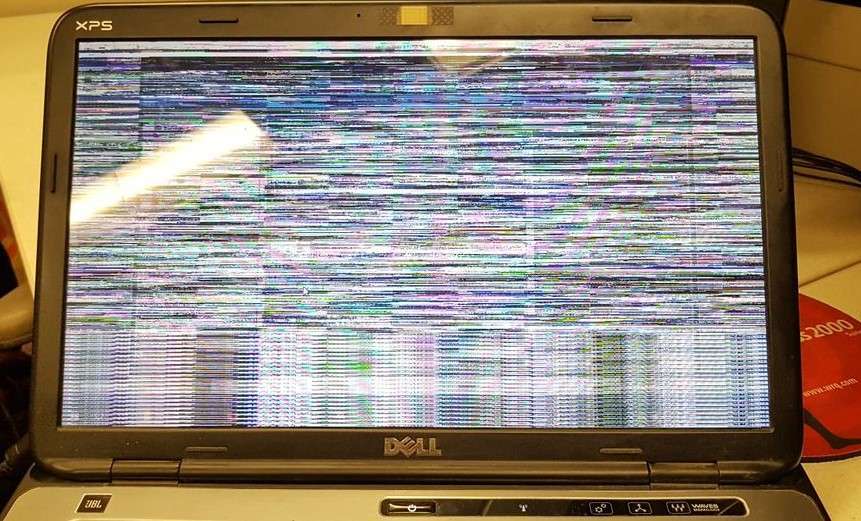
Fix Laptop Screen Flickering in Nagpur: Expert Repair Services at Kartik Computers
Are you struggling with a flickering laptop screen? Whether you’re working, gaming, or watching videos, a flickering display can be incredibly frustrating and disrupt your productivity. If you’re in Nagpur and need quick, reliable solutions for laptop screen flickering, Kartik Computers offers professional repair services to fix your screen issues and restore your laptop to its full functionality.
Why Is Your Laptop Screen Flickering?
Before diving into the solution, it’s essential to understand why your laptop screen might be flickering. There are several reasons that can cause a flickering screen, including:
- Driver Issues: Outdated or corrupted graphics drivers are one of the most common causes of screen flickering. A simple driver update or reinstall can often fix this problem.
- Hardware Problems: A loose connection or malfunctioning display cables can cause the screen to flicker, requiring professional repair services to replace or reattach the hardware components.
- Software Conflicts: Certain applications or software may conflict with your laptop’s display settings, resulting in flickering. Identifying and resolving these conflicts can often solve the problem.
- Overheating: Prolonged usage can cause your laptop to overheat, which may also impact the display’s performance, including flickering.
- Faulty Graphics Card: A malfunctioning graphics card can also result in display issues. If this is the cause, it may require a hardware upgrade or replacement.
How Kartik Computers Can Help
At Kartik Computers, we specialize in diagnosing and fixing a wide range of laptop screen issues, including flickering. Our expert technicians will carefully assess your laptop to determine the root cause of the flickering and recommend the best course of action for repair. Here’s how we can help:
- Thorough Diagnosis: We start by running comprehensive diagnostic tests to identify whether the issue is caused by software, hardware, or a faulty connection.
- Graphics Driver Updates: If outdated or corrupted drivers are to blame, we’ll update or reinstall the graphics drivers to restore your screen’s functionality.
- Hardware Repairs: If a loose connection or damaged components are the issue, our technicians will carefully replace or repair the necessary hardware.
- Screen Replacement: In cases where the screen itself is damaged or defective, we offer affordable screen replacement services with high-quality screens that match your laptop’s specifications.
- Affordable Prices: At Kartik Computers, we ensure that you get the best quality repair services at reasonable prices, without any hidden fees.
Why Choose Kartik Computers for Laptop Screen Flickering Repair in Nagpur?
When your laptop screen starts flickering, it’s crucial to choose a repair service that’s fast, reliable, and professional. Here’s why Kartik Computers is your go-to choice in Nagpur:
- Experienced Technicians: Our team is composed of highly skilled technicians who have years of experience in laptop repair. Whether it’s a minor issue or a major hardware malfunction, we can fix it efficiently.
- Quick Turnaround Time: We understand that you rely on your laptop for work or personal use. That’s why we strive to offer fast and effective repair services to get your device back to you as quickly as possible.
- Affordable Solutions: Our repair services are priced fairly, ensuring you don’t have to break the bank to fix your laptop. We also offer various repair packages to suit different needs.
- Quality Service: We only use top-quality parts and offer warranties on our repairs, giving you peace of mind that your laptop is in safe hands.
- Local and Convenient: Based in Nagpur, we’re a trusted local business. When you choose us, you’re supporting a local repair service that values customer satisfaction.
How to Prevent Laptop Screen Flickering
Once your laptop screen is repaired, here are some tips to prevent future flickering issues:
- Keep Drivers Updated: Regularly check for updates to your graphics drivers to avoid software conflicts.
- Avoid Overheating: Ensure your laptop is properly ventilated and take breaks to avoid excessive heat buildup.
- Regular Maintenance: Perform routine maintenance, such as cleaning your laptop’s interior, to prevent dust buildup that could cause overheating or other display issues.
Visit Kartik Computers for Expert Laptop Screen Flickering Repair in Nagpur
If you’re tired of dealing with a flickering laptop screen, Kartik Computers is here to help. With years of experience, a team of expert technicians, and affordable repair options, we are the leading choice for laptop screen flickering repair in Nagpur.
Visit our store or contact us today to book your appointment or get a free consultation. Let us take care of your laptop’s screen flickering issue so you can get back to your important tasks without interruptions!
