
Acer Aspire 3 Hinge Repair in Nagpur: Real Laptop Repair Case Study
A laptop hinge problem can start with something as simple as the screen becoming difficult to open or close. If the issue is ignored, continued use can put additional stress on the top panel, display assembly, and hinge mounting area.
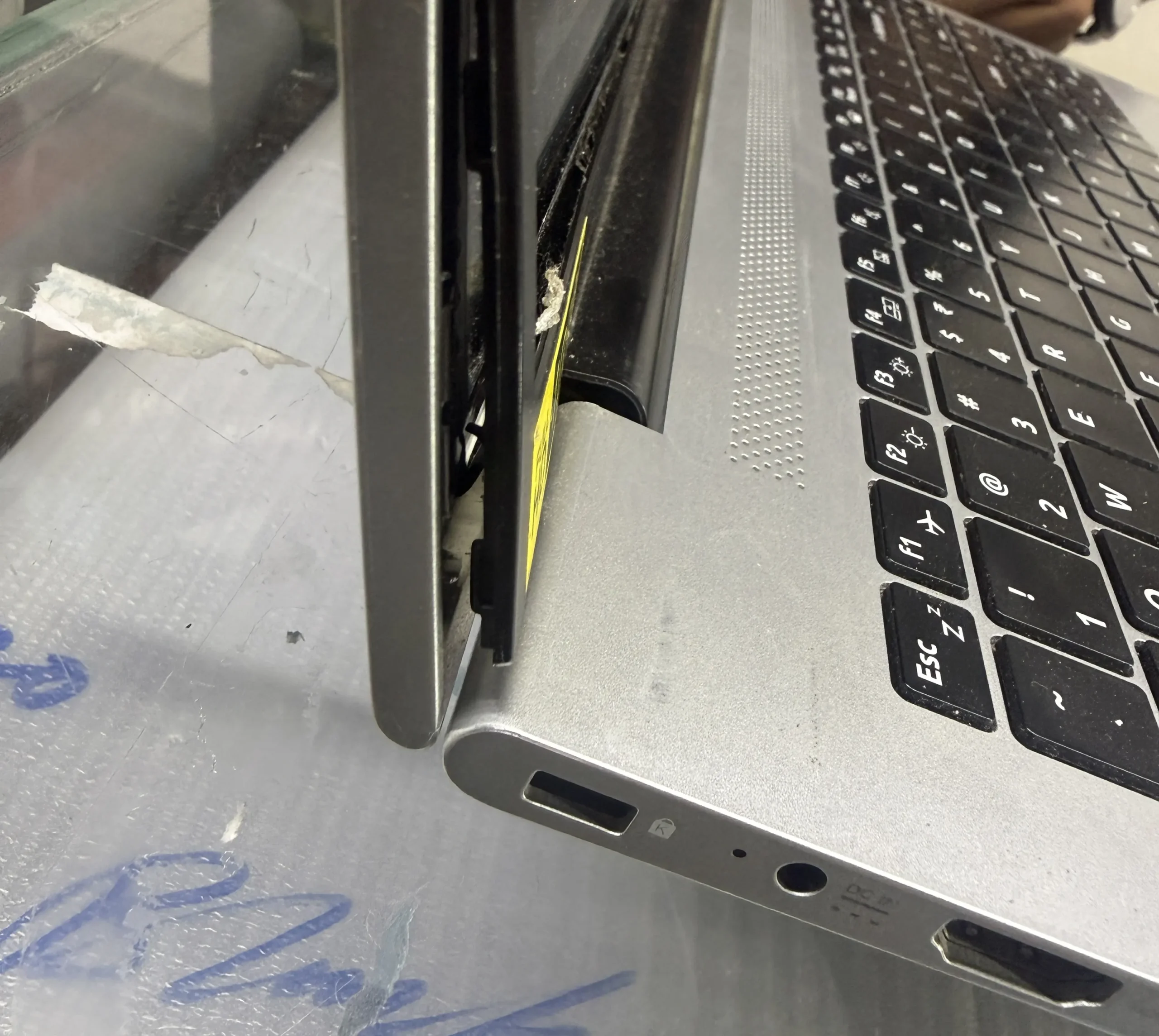
This case study covers a real Acer Aspire 3 laptop hinge repair carried out at Kartik Computers in Nagpur. The laptop’s display was working properly, but the hinges had become tight and were making the screen difficult to open and close smoothly.
Repair Overview
Device: Acer Aspire 3 Laptop
Problem: Tight laptop hinges
Display Condition: Working properly
Service: Hinge repair and top-panel restoration
Repair Location: Kartik Computers, Panchsheel Chowk, Dhantoli, Ramdaspeth, Nagpur
Repair Time: Approximately 4–5 hours
Customer Complaint
The customer brought the Acer Aspire 3 directly to our store after noticing a problem with the laptop hinges.
The screen itself was working normally, but the hinges had become unusually tight. This made opening and closing the laptop difficult and could potentially cause further stress to the surrounding top panel if continued.
After receiving the laptop, our technician inspected the hinge movement and the condition of the laptop body and display assembly.
Initial Diagnosis
During the inspection, we found that the main issue was related to the tight hinge mechanism.
The display was functioning correctly, so there was no need for screen replacement. The problem was focused on the hinge movement and its connection with the laptop’s top panel.
Based on the inspection, we prepared a quotation for the required repair.
Customer Approval
The quotation was discussed with the customer, and the repair was approved over a phone call.
After receiving approval, the repair process was started.
Acer Aspire 3 Hinge Repair Process
The hinge repair required careful disassembly of the laptop.
The Acer Aspire 3 was opened carefully to access the display assembly and top-panel area. Because the display was working properly, extra care was taken while removing and handling the screen.
The screen was carefully removed to gain proper access to the hinge mechanism.
The complete opening and preparation process took approximately 4–5 hours because the work required careful handling of the laptop’s internal components and display assembly.
Hinge Adjustment and Repair
After accessing the hinge area, the tight hinge movement was inspected.
The hinge was carefully worked on to restore smoother movement. The objective was to make the hinge easier and safer to operate without putting excessive force on the laptop’s display assembly.
The hinge and top-panel mounting area were then carefully secured using an appropriate adhesive as part of the repair.
The laptop was subsequently reassembled with careful attention to the display, top panel and hinge alignment.
Testing After Repair
After completing the repair, the Acer Aspire 3 underwent testing.
The hinge movement was checked by opening and closing the laptop several times to make sure the screen could be flipped smoothly.
The display was also checked to confirm that it continued to function properly after the repair.
The laptop passed the final testing successfully.
Final Result
The Acer Aspire 3 was successfully repaired and handed back to the customer.
The laptop’s display was working properly, and the hinge movement was restored to a smoother condition.
The customer was happy after seeing that the laptop was working properly and the hinge issue had been addressed.
What Causes Laptop Hinges to Become Tight?
Laptop hinges can become difficult to operate for several reasons, including:
- Long-term mechanical wear
- Hinge components becoming stiff
- Stress around the hinge mounting area
- Repeated opening and closing
- Physical impact or pressure
- Damage or weakening around the hinge mounts
A tight hinge should not be ignored because excessive force during opening can place additional stress on the laptop’s display assembly and surrounding body.
Signs Your Laptop Hinge Needs Inspection
Consider getting a laptop checked if you notice:
- The screen is difficult to open
- The hinge feels unusually tight
- Cracking or unusual sounds occur while opening the laptop
- The display frame starts separating
- The laptop body flexes around the hinge
- The screen does not move smoothly
- One side of the display moves differently from the other
Early inspection can help determine whether the problem is limited to the hinge or whether the surrounding laptop body has also been affected.
Case Study Summary
This Acer Aspire 3 repair was a good example of how a tight laptop hinge can affect the usability and physical structure of a laptop even when the display itself is working normally.
At Kartik Computers, the laptop was inspected, the repair quotation was approved by the customer, and the hinge repair was completed with careful handling of the display and top-panel assembly. After reassembly and testing, the laptop was successfully handed back to the customer in working condition.
Repair Case Study: Acer Aspire 3 Hinge Repair in Nagpur
Location: Kartik Computers, Panchsheel Chowk, Dhantoli, Ramdaspeth, Nagpur
