
At Kartik Computers, we provide expert laptop repair services with fast turnaround times, skilled technicians, genuine parts, and reliable solutions for hardware and software issues. Visit us for quick diagnostics and affordable pricing.
At Kartik Computers, we provide expert laptop repair services with fast turnaround times, skilled technicians, genuine parts, and reliable solutions for hardware and software issues. Visit us for quick diagnostics and affordable pricing.
At Kartik Computers, we provide expert laptop repair services with fast turnaround times, skilled technicians, genuine parts, and reliable solutions for hardware and software issues. Visit us for quick diagnostics and affordable pricing.
At Kartik Computers, we provide expert laptop repair services with fast turnaround times, skilled technicians, genuine parts, and reliable solutions for hardware and software issues. Visit us for quick diagnostics and affordable pricing.
At Kartik Computers, we provide expert laptop repair services with fast turnaround times, skilled technicians, genuine parts, and reliable solutions for hardware and software issues. Visit us for quick diagnostics and affordable pricing.
At Kartik Computers, we provide expert laptop repair services with fast turnaround times, skilled technicians, genuine parts, and reliable solutions for hardware and software issues. Visit us for quick diagnostics and affordable pricing.
At Kartik Computers, we provide expert laptop repair services with fast turnaround times, skilled technicians, genuine parts, and reliable solutions for hardware and software issues. Visit us for quick diagnostics and affordable pricing.
Building a gaming PC can be a rewarding and enjoyable experience. Here are the general steps you need to follow to build a gaming PC:
- Determine your budget and gaming needs: Decide how much you want to spend and what games you want to play. This will help you determine the components you need to buy.
- Choose your components: Research and select the best components for your budget and gaming needs. The key components you need to consider are the CPU, motherboard, GPU, RAM, storage, power supply, and case.
- Gather your tools: You will need a few tools to assemble your PC, including a screwdriver, thermal paste, and cable ties.
- Assemble your PC: Follow the instructions that come with your components to assemble your PC. Start by installing the CPU and its cooler onto the motherboard, then install the RAM, storage, and power supply. Finally, install the motherboard into the case and connect all the necessary cables.
- Install the operating system and drivers: Once your PC is assembled, install your operating system and necessary drivers. This will allow you to use your PC and play your favorite games.
- Test your PC: Before you start gaming, make sure to test your PC to ensure everything is working correctly. Run stress tests and benchmarking tools to ensure your PC is performing at its best.
Building a gaming PC can be a challenging task, but it’s also a fun and rewarding experience. Take your time, follow the instructions carefully, and enjoy the process!
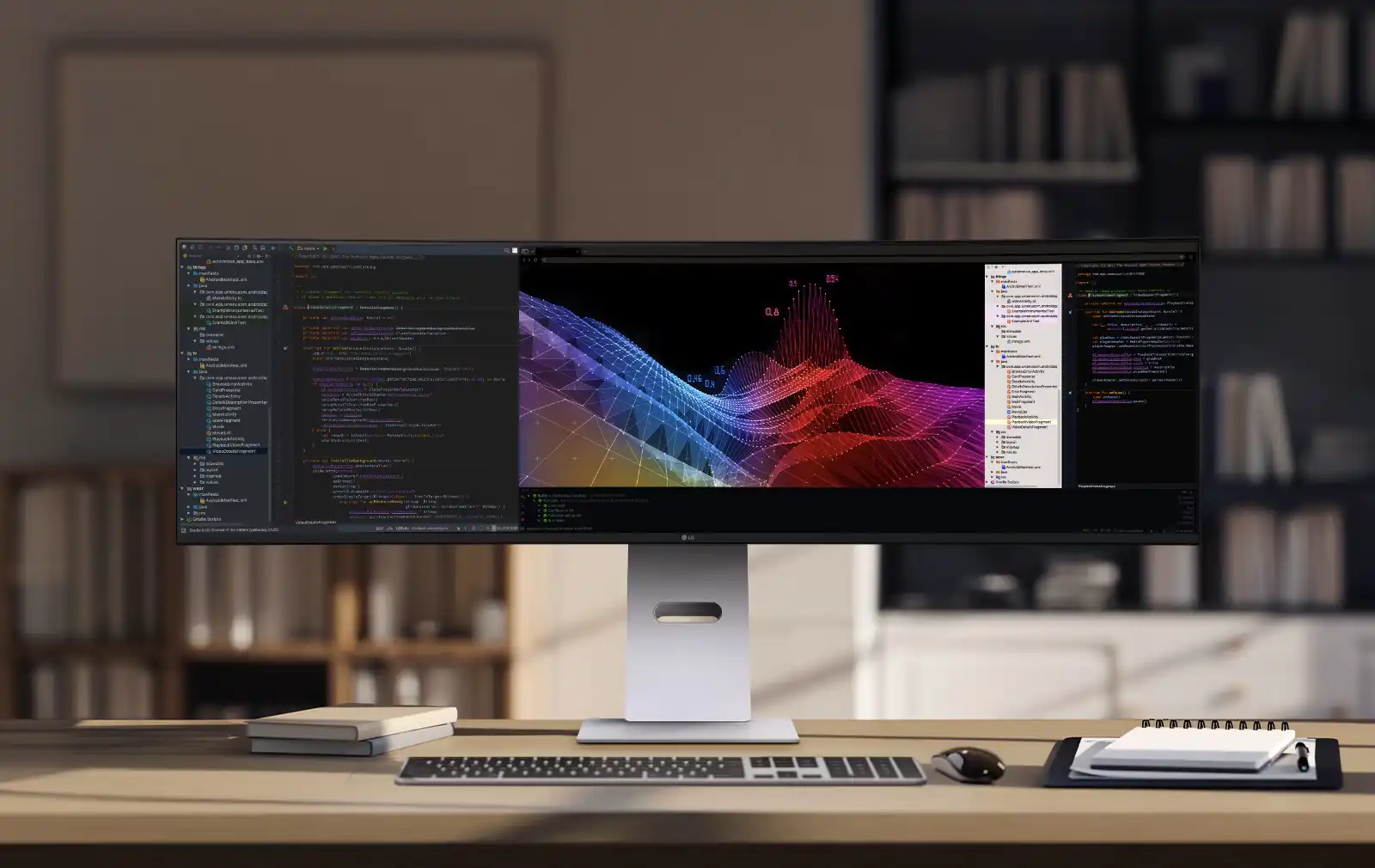
The world of monitors has reached a new level of brilliance. The LG 49-inch UltraWide Curved Dual QHD Nano IPS Monitor combines top-notch display technology with performance aimed at gamers and professional-level color accuracy. Whether you are a dedicated gamer, a creative professional, or someone who juggles multiple tasks, this monitor is made to exceed expectations.
UltraWide 49-inch Dual QHD Curved Display (5120×1440)
The LG 49-inch monitor features a 21:9 aspect ratio and a large Dual QHD resolution of 5120×1440. It feels like having two 27-inch QHD monitors seamlessly blended together, but without the bezels that disrupt immersion.
- Panoramic workspace: Ideal for multitasking, editing, or running several windows at once.
- Immersive curvature: The gentle curve surrounds your vision for a nearly cinematic experience in games and movies.
This monitor is more than just a screen; it acts as a visual canvas that broadens your productivity and entertainment options.
Blazing Speed: 144Hz Refresh Rate & 1ms MBR
Gamers want speed, and LG delivers:
- 144Hz refresh rate: Experience ultra-smooth gameplay with fluid motion and no stutter.
- 1ms Motion Blur Reduction (MBR): Every frame remains sharp, giving you an edge in fast-paced action.
From first-person shooters to racing games, every millisecond matters with this monitor.
Nano IPS Technology with sRGB 98%
For professionals and creators, the Nano IPS panel makes a significant difference.
- 98% sRGB coverage (Typ.): Offers true-to-life color reproduction ideal for photography, design, and video editing.
- Factory color calibration: Provides accurate colors right out of the box, minimizing the need for adjustments.
This makes the LG 49-inch UltraWide not just a gaming monitor but also an excellent display for creative work.
VESA DisplayHDR™ 400 & 400 nits Brightness
HDR enhances visuals. LG takes it further with VESA DisplayHDR™ 400.
- 400 nits brightness (Typ.): Delivers clear, bright, and vibrant visuals even in bright rooms.
- Better contrast and highlights: Produces brighter whites, deeper blacks, and more lifelike details.
Every movie, game, and creative project looks cinematic and engaging.
Built-in Stereo Speakers with Rich Bass
Unlike many high-end monitors, LG equipped this display with 2 x 10W stereo speakers that provide rich bass performance.
- Immersive sound: Great for casual gaming, music, and movies.
- Clean setup: Reduces the need for external speakers on your desk.
For everyday users, the audio experience is sufficient, while audiophiles can still opt for dedicated speakers.
Gamer-Focused Features
LG ensures gamers receive more than just speed and visuals:
- Black Stabilizer: Brightens dark areas to help spot enemies more quickly.
- Dynamic Action Sync (DAS): Lowers input lag for rapid responses.
- Game Mode presets: Optimizes display settings for FPS, RTS, and RPG games.
- On-Screen Crosshair: Improves shooting accuracy in competitive games.
These features make the LG 49-inch UltraWide a gaming powerhouse.
Why Choose the LG 49-inch UltraWide Curved Monitor?
- A productivity beast: Replace dual monitors with one seamless, ultra-wide workspace.
- A gamer’s dream: 144Hz, 1ms, HDR, and gaming-specific features.
- A creator’s tool: Nano IPS, sRGB 98%, and factory calibration.
- An entertainment hub: Large curved screen plus built-in stereo sound.
With this monitor, LG delivers more than just specs; it offers an experience.

Are you struggling with poor or no sound during voice calls on your computer? Whether it’s a distorted microphone, muted audio, or software glitch, voice call problems can disrupt your work and communication. At Kartik Computers in Nagpur, we specialize in diagnosing and fixing computer voice call issues, restoring clear audio for your meetings, chats, and online collaborations.
🔍 Common Reasons for Voice Call Issues on Computers
When your voice or audio doesn’t work during calls on Zoom, Microsoft Teams, Google Meet, or Skype, the issue could stem from:
✔ Faulty Microphone – Internal or external microphones may fail due to hardware damage or loose connections.
✔ Audio Driver Issues – Outdated or corrupt drivers often cause mic and speaker malfunctions.
✔ Incorrect Audio Settings – Misconfigured sound settings can disable your mic or speakers unknowingly.
✔ Muted Permissions – Some applications may block microphone access due to privacy settings.
✔ Malware or Software Conflicts – Background processes or viruses may interfere with voice call functions.
✔ Operating System Bugs – Windows/macOS updates can occasionally lead to compatibility problems.
If you’re facing audio issues during video or voice calls, don’t wait—get it fixed by professionals at Kartik Computers.
🛠️ Our Voice Call Repair Process
At Kartik Computers, we follow a proven step-by-step approach to identify and fix voice call problems efficiently.
1. Hardware Inspection
We start by checking:
- Internal microphone and audio jack ports
- Headphone/mic connection integrity
- Bluetooth device pairing for wireless headsets
If physical damage or wear is found, we recommend a replacement or repair.
2. Audio Driver Repair
We diagnose driver-related issues by:
- Reinstalling or updating audio drivers
- Fixing compatibility between OS and sound hardware
- Using diagnostic tools to ensure all audio devices are detected properly
For system optimization, visit: Computer Slow Performance Solutions in Nagpur
3. Microphone & Permissions Troubleshooting
If the mic isn’t working, we:
- Check app permissions and privacy settings
- Test using system-level sound recording tools
- Reconfigure default input/output devices
- Remove unnecessary background software interfering with audio
4. App-Specific Fixes
Voice call issues often arise only in specific apps. We repair:
- Zoom audio problems
- Microsoft Teams mic not working
- Google Meet distorted audio
- Skype call dropouts
We ensure your apps have proper access to mic and speakers.
5. System Cleanup & Malware Scan
In some cases, malware or rogue software can block sound functions. We perform:
- Full system scan using trusted antivirus tools
- Cleanup of background services using up resources
- Reset of misbehaving OS components
For virus removal support, check: Virus Removal Services in Nagpur
💡 Why Choose Kartik Computers for Audio Call Fixes in Nagpur?
✔ Experienced Technicians – Decades of expertise in fixing PC audio issues
✔ Quick Diagnostics – Get problems identified and solved in minimal time
✔ Brand Compatibility – We repair all major brands: HP, Dell, Lenovo, ASUS, Acer, MacBook, and more
✔ Safe Repairs – We ensure your data is never lost or compromised
✔ Affordable Pricing – Transparent and budget-friendly service plans
✔ Post-Service Support – Guidance on maintaining your audio system long-term
🧰 Tips to Avoid Voice Call Issues in Future
✔ Regularly update your OS and audio drivers
✔ Avoid installing unknown or third-party audio apps
✔ Keep your antivirus up to date
✔ Test your microphone and speaker settings monthly
✔ Avoid using low-quality or damaged external mics/headsets
For help with software updates, visit: Laptop Software Update Services in Nagpur
🎯 Restore Clear Voice Communication Today!
Whether you’re working from home, attending online classes, or catching up with loved ones, voice clarity is essential. Let Kartik Computers in Nagpur fix your computer voice call problems with expert care and fast turnaround.
For display-related issues, check: Laptop Screen Replacement in Nagpur
📍 Visit our service center in Nagpur or call us for expert voice call troubleshooting services.
📱 Follow Kartik Computers on:
📷 Instagram
📘 Facebook
🐦 Twitter (X)